A glass tips over, or a cup of kopi slides off the desk, and your laptop is suddenly sitting in a puddle. What you do in the next hour matters more than anything a technician does later, because most liquid damage is decided before the laptop ever reaches a repair bench.
If you’ve just spilled water on your laptop, this guide covers the first steps, the popular fixes that make things worse, and how to tell when you need water damaged laptop repair in Singapore. It can’t promise a rescue for every laptop, but it will give yours the best chance.
At The Repair Hospital, every repair starts with a free diagnosis and a written quote, and nothing is repaired until you approve it. We hold a 4.7-star Google rating from 670+ reviews.


In short
- Switch the laptop off, unplug the charger and everything else, and don’t turn it back on to test it.
- Blot it dry and keep it away from heat. Rice doesn’t help.
- Sweet or milky drinks such as kopi, teh or bubble tea leave a residue that keeps causing damage after the liquid dries.
- A laptop that works after a spill can still fail days or weeks later because of corrosion.
- A technician can only tell you the cost and the odds after opening the laptop and checking it.
What should you do in the first hour after spilling water on your laptop?
Cut the power straight away. Hold the power button until the laptop switches off, unplug the charger and any accessories, then blot away the liquid you can see without rubbing it in. Keep the laptop off and away from heat, note what spilled and when, and get it checked rather than switching it on to test it.
The first 10 minutes, step by step
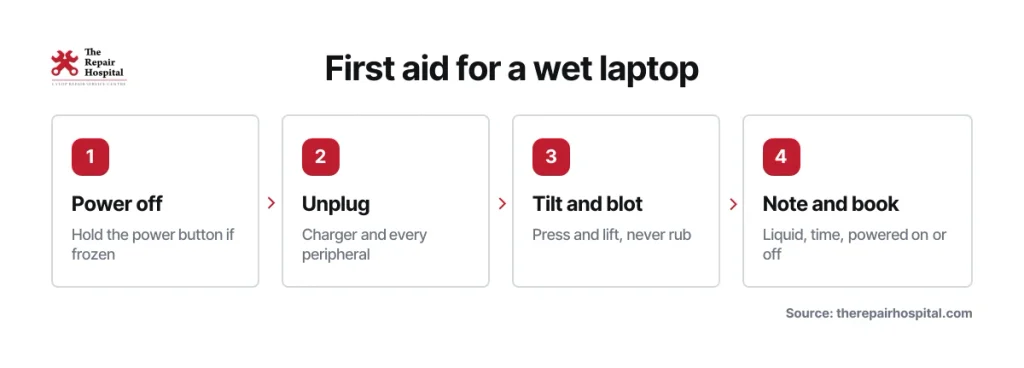
- Switch it off now. Don’t go through the Start menu. Hold the power button until the screen goes dark. Losing unsaved work is better than leaving current running through a wet board.
- Unplug the charger and every accessory. That includes the mouse, USB drives, external disks and dongles.
- Take the battery out only if it’s designed to come out. Most modern laptops have a sealed battery. Don’t open the case at home.
- Blot, don’t wipe. Press a lint-free cloth or paper towel onto the keyboard, the palm rest and the edges, then lift it off. Wiping pushes liquid into the gaps.
- Let it drain the way your manufacturer recommends. See the note below.
- Keep it away from heat. No hair dryer, no heater, no sunny window ledge.
- Write down three things: what the liquid was, roughly what time it happened, and whether the laptop was on.
Those three notes help more than you might think. A technician uses them the way a doctor uses a patient’s history, because they show where to look first.
Should you turn the laptop upside down?
It depends on the model. Repair guides such as iFixit’s spill advice suggest turning the laptop over so liquid runs out. Lenovo’s guidance for some models says the opposite, because their keyboards have drainage holes underneath. If you’re not sure, open the lid wide, rest the laptop on a towel, and don’t shake it.
Is a coffee or teh spill worse than plain water?
Yes, usually. Plain water is the easier spill. Kopi, teh, bubble tea, soft drinks and juice leave sugar, milk and other residue behind once the liquid dries. That sticky film holds moisture and keeps attacking the board, so a laptop with a sweet or milky spill should be checked within the day, not left to see whether it dries out.
In Singapore, the usual culprits are a morning kopi with condensed milk, a teh peng or a bubble tea knocked over at a home office desk. All of them carry more sugar and milk than a glass of water. Salty liquids and soup are worse again, because salt speeds up corrosion.
What should you not do after spilling liquid on your laptop?
Don’t switch it on to see if it still works, and don’t try to dry it with heat or rice. Powering on a wet laptop is the most common way a fixable spill becomes a bigger repair. Heat, shaking and compressed air mostly move liquid deeper into the laptop rather than getting it out.
| Common “fix” | Why it backfires |
|---|---|
| Switching on to test it | Sends current through a wet board, which is what causes short circuits |
| A bag of uncooked rice | Rice can’t pull moisture out from inside the laptop, and the starch and dust can end up in ports, fans and under keys. iFixit says plainly that it doesn’t work. |
| Hair dryer, oven or heater | Pushes moisture further in and can warp plastic parts |
| Leaving it in the sun | Heats the battery unevenly and doesn’t dry anything under the keyboard |
| Shaking it | Spreads liquid to parts the spill never reached |
| Compressed air | Blows droplets into connectors and under components |
If you’ve already tried one of these, that’s fine. Mention it when you bring the laptop in, because it tells the technician what to look for.
Can a laptop that works after a spill still fail later?
Yes. A laptop can boot normally after a spill and then start failing days or weeks later. Moisture and residue trapped inside keep corroding the copper traces and solder joints on the board. That damage spreads under components where you can’t see it, and it builds faster when power is running through the board.
Watch for these signs after even a small spill:
- keys that stop responding, or type on their own
- a charging port that stops charging, or a battery that drains unusually fast
- random shutdowns, or a laptop that only starts some of the time
- a screen that flickers or shows lines
Singapore’s humidity doesn’t help. The residue left by a spill attracts moisture from the air, so a laptop kept in a humid HDB bedroom or a non-air-conditioned room can keep corroding long after it looks dry. A wipe of the outside doesn’t reach any of this.
When does a water damaged laptop need a technician?
Book a free diagnosis if liquid went into the keyboard, vents or ports, if the drink was sweet, milky or salty, or if the laptop was on when it got wet. Do the same if you notice heat, a burning smell, a swollen base or misbehaving keys. A few drops wiped off the lid straight away usually just need watching.
A rough guide:
- Keep an eye on it: a few drops on the lid or the outer case, wiped off straight away, with nothing reaching the keyboard.
- Book a check within the day: any liquid on or under the keyboard, any sweet or milky drink, or a laptop that was switched on during the spill.
The diagnosis costs nothing. You get a written quote, and nothing is repaired until you approve it, so a check doesn’t commit you to anything.
- Stop and don’t touch the power: a burning smell, smoke, heat, or a base that has started to bulge. A swollen battery is a fire risk, so leave it switched off and unplugged.
Using a MacBook? The first-hour steps are the same. For Mac-specific repair options, start at our MacBook repair page.
What happens during water damaged laptop repair?
Liquid damage repair is a sequence, and each stage tells the technician what the next one needs. It starts with a free diagnosis and a written quote, then moves through opening the laptop, cleaning off residue, drying it fully, removing corrosion and testing each component. Only the parts that fail testing are replaced, and nothing is repaired until you approve the quote.
The usual order is:
- Intake and questions. What spilled, when, and whether the laptop was on. These are the notes you wrote down in the first ten minutes.
- Free diagnosis. Power checks, then the laptop is opened and the board inspected for residue and corrosion. You then get a written quote, which is why a firm figure comes after diagnosis, not before.
- Cleaning. Residue is removed from the board and connectors. Some boards suit ultrasonic cleaning, which uses high-frequency vibration in a cleaning bath to reach under chips. It removes what’s sitting on the board, but it can’t restore traces or chips that have already burned out.
- Drying. The board has to be completely dry before anyone powers it up again.
- Corrosion removal and component testing. Each part is tested, and only those that fail are repaired or replaced.
- Final check. The laptop is tested again before it’s returned to you.
For Dell, HP, Lenovo, ASUS, Acer, MSI and other Windows models, our Windows laptop repair page covers the brands we work on and the other faults we fix. If the spill has stopped your laptop powering on at all, our guide to what to check when a laptop won’t turn on explains why you shouldn’t keep pressing the power button after liquid contact.
How much does laptop water damage repair cost?
It depends on how far the liquid travelled and how quickly the laptop was switched off. A light spill that’s caught early may only need cleaning and inspection. Liquid that reached the board can mean corrosion clean-up and component-level repair. Data recovery is a separate job on top. The exact figure comes in a written quote after the free diagnosis, once the laptop has been opened.
Our laptop repair cost guide lists typical price ranges for liquid damage alongside other common repairs, so you can get a sense of cost before you come in.
Two things to check before you book:
- Your warranty. Standard manufacturer warranties usually don’t cover spills. Dell, for example, covers liquid spills only under its separate Accidental Damage plan. If you bought accidental damage cover, check it first.
- Extended warranty or insurer cover. We’re an authorised service provider for Harvey Norman Extended Warranty and Ruggear Service Centre. If your laptop is covered, send us the details on WhatsApp and we’ll tell you how to proceed.
Can you save your files from a water damaged laptop?
Sometimes, but nobody can promise it before checking the drive. The most important thing is not to boot a wet laptop just to copy files off it, because powering it on can short the board and damage the storage too. Check first whether your files are already backed up to the cloud or an external drive.
If the files matter more than the laptop, say so when you bring it in, so the technician can plan around the storage drive. Recovering data from a liquid-damaged drive is a separate job from repairing the laptop. Our data recovery services page explains how it works.
Bringing your laptop in
The Repair Hospital, Singapore’s top laptop repair shop, offers a free diagnosis and a written quote on every water damaged laptop, and nothing is repaired until you approve it.
Keep the laptop switched off all the way to the counter. Bring the charger, and tell us what spilled and roughly when. If you know what was in the drink, such as milk, sugar or salt, mention that too.
- Main Service Centre (Aljunied): ATRIX @ 82 Lor 23 Geylang, #06-12, Singapore 388409. Monday to Saturday, 11am to 7pm. Closed on Sundays and public holidays.
- Drop-off point (Clementi, by appointment only): King Potato Eyewear, Blk 328 Clementi Ave 2, #01-192, Singapore 120328. 11am to 7pm, closed on Wednesdays and Sundays.
It’s best to WhatsApp or call us on 8282 3368 before you visit, or call our hotline on 6292 1331.
Frequently asked questions
How long should I wait before switching my laptop back on after a spill?
There’s no safe fixed waiting time. If liquid only touched the outside and you wiped it off at once, wait until you’re certain it’s completely dry. If liquid got into the keyboard, vents or ports, don’t switch it on at all. Have it opened and checked first, because it can still be wet inside after a day or two.
Is it safe to take the battery out myself?
Only if your laptop has a battery that’s designed to be removed without tools. Most modern laptops have a sealed battery, and opening the case at home risks damaging the board or the battery. Switch it off, unplug everything and bring it in as it is.
Can any repair shop guarantee to fix a water damaged laptop?
No honest shop can. The outcome depends on the liquid, how fast the laptop was switched off, whether it was on during the spill and how far corrosion has spread. The free diagnosis tells you what’s realistic for your laptop, and you decide whether to go ahead once you’ve seen the written quote.
My laptop seems fine after a small spill. Do I still need to get it checked?
If the liquid stayed on the outside, keeping an eye on it is reasonable. If any liquid went into the keyboard or vents, or the drink was sweet or milky, a check is worth it even if everything seems to work. Corrosion can take days or weeks to show up as a faulty key, port or charging problem.